Smartbox.ai Gen 2 is in beta. General availability January 2027. Join the beta

Smartbox.ai

Smartbox.ai Gen 2 · Now in beta

Rewriting the rules of disclosure.

Smartbox.ai is the AI redaction and disclosure platform for subject access, FOI and EIR, public inquiries, criminal and civil disclosure, and health records.

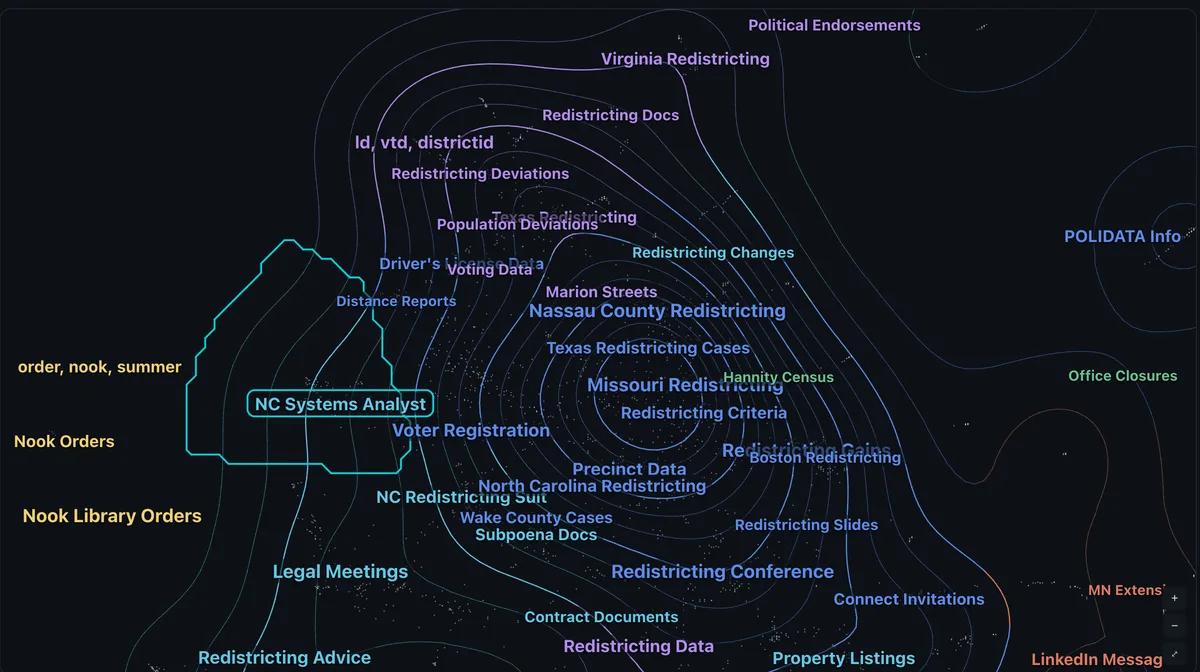
  1. 1 · FindThe topic map shows what is in scope before anyone reads a page.
    The topic map of a case, with topics labelled where their documents cluster.
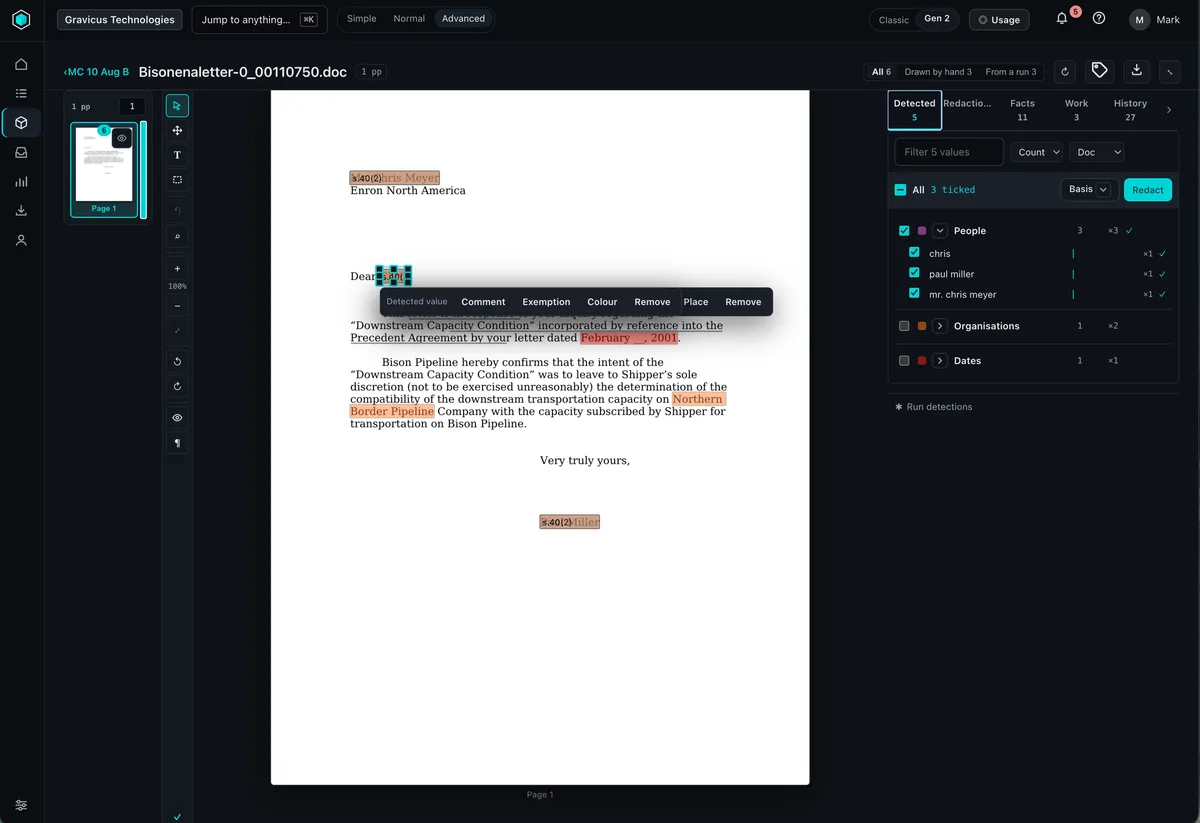
  2. 2 · Review & redactA reason for every redaction, in documents, video and audio.
    A redacted document in the viewer, each redaction labelled with its exemption.
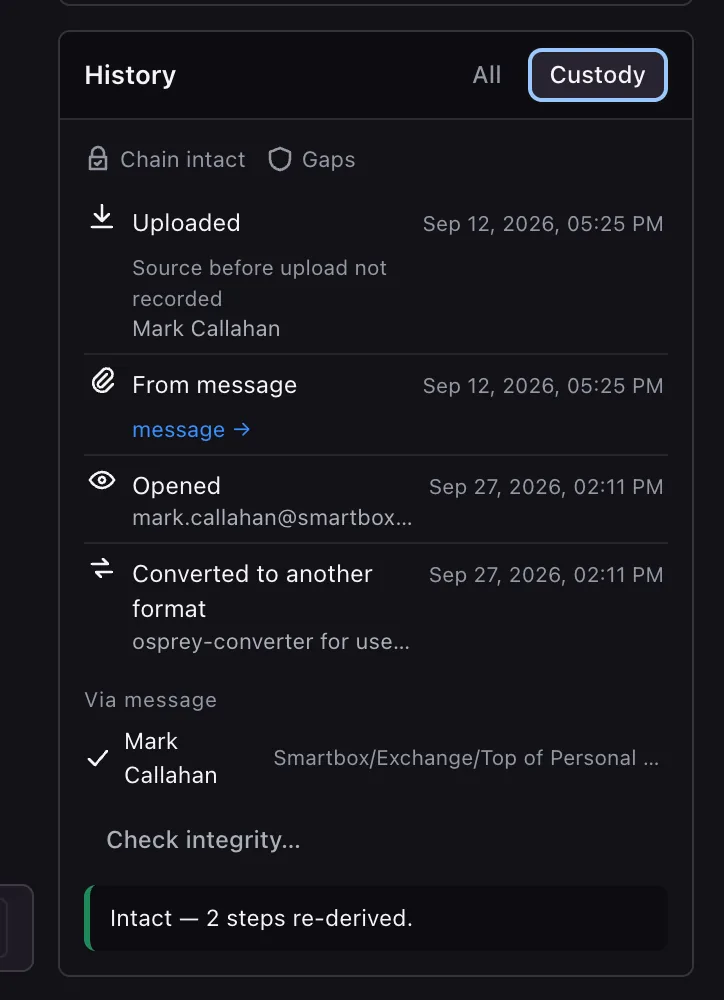
  3. 3 · Release and proveValidated at the gate, released once, every decision on the record.
    A document's chain of custody, listing each event with who did it and when.

The old rules, and the new ones.

Disclosure software grew up around workarounds. Gen 2 starts again from the work itself.

The old ruleGen 2
Read everything to find anything.See the shape of the case first, on the topic map.
Every request pushed along by hand.Workflows that run end to end, from the first email.
Video goes out to a specialist.Video and audio redacted where you redact documents.
Long documents get split to fit.No limit on pages per document.
Deadlines live in a spreadsheet.SLA clocks built into every case.
Case emails live in someone’s inbox.Every case has its own inbox, recording every communication.
Check the bundle by eye.Production sets validated before they leave.
One screen for every role.Simple, Normal and Advanced experiences, by role.
Costs you only see at the end.Credits you can see, and control, as you go.

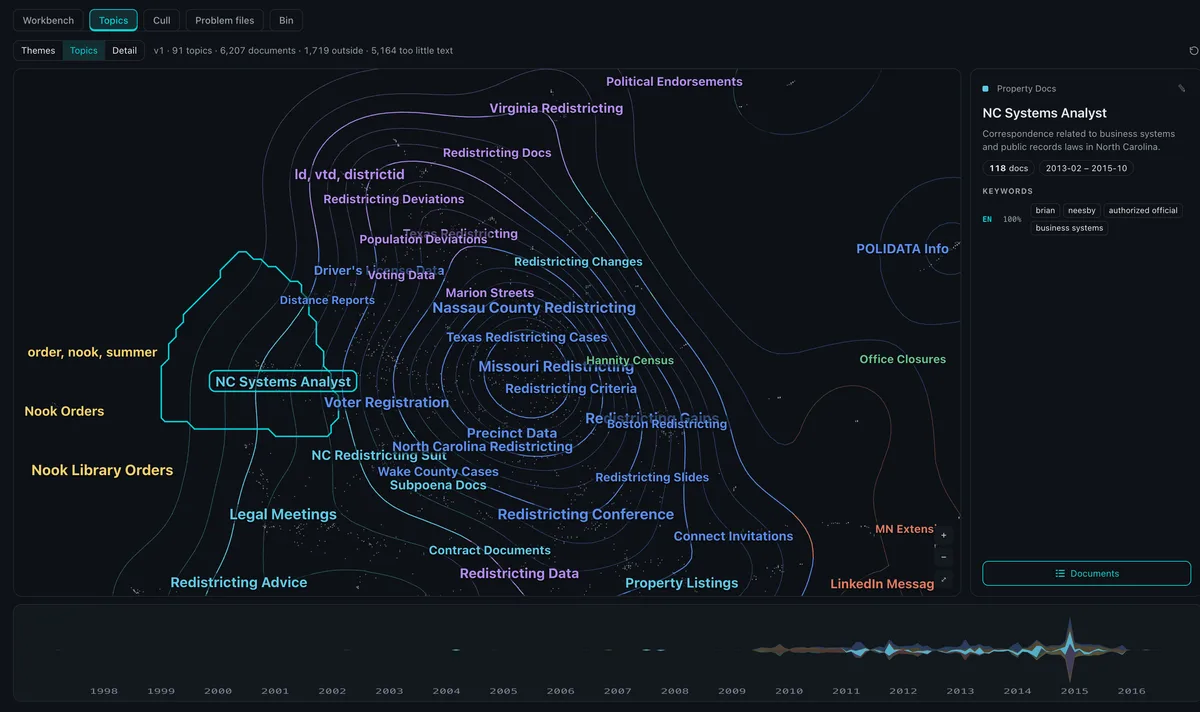
The topic map

Understand a case before you read a page.

Unsupervised machine learning reads every document and draws the case as a landscape of themes and topics, laid out across time. Scope a request, find what matters and set aside what doesn’t, in minutes rather than weeks of reading.

The topic map in a case, with the selected topic's panel showing its description, document count, date range and keywords, and a timeline of topics from 1998 to 2016 beneath the map.
  • Themes, topics, detail

    Zoom from the broad shape of a case to one thread of correspondence.

  • Topics across time

    The timeline shows when each topic was live, so a date range is a click, not a query.

  • Keywords and counts

    Each topic shows its documents, keywords, language and date range.

  • Act on a topic

    Send a topic to review, cull it from scope or open its documents in the workbench.

Explore the topic map

See the topic map on your own material.

Giving you control.

Gen 2 is built around three controls every disclosure team needs, from the first email to the last page released.

01 · Control your data

Know what you hold.
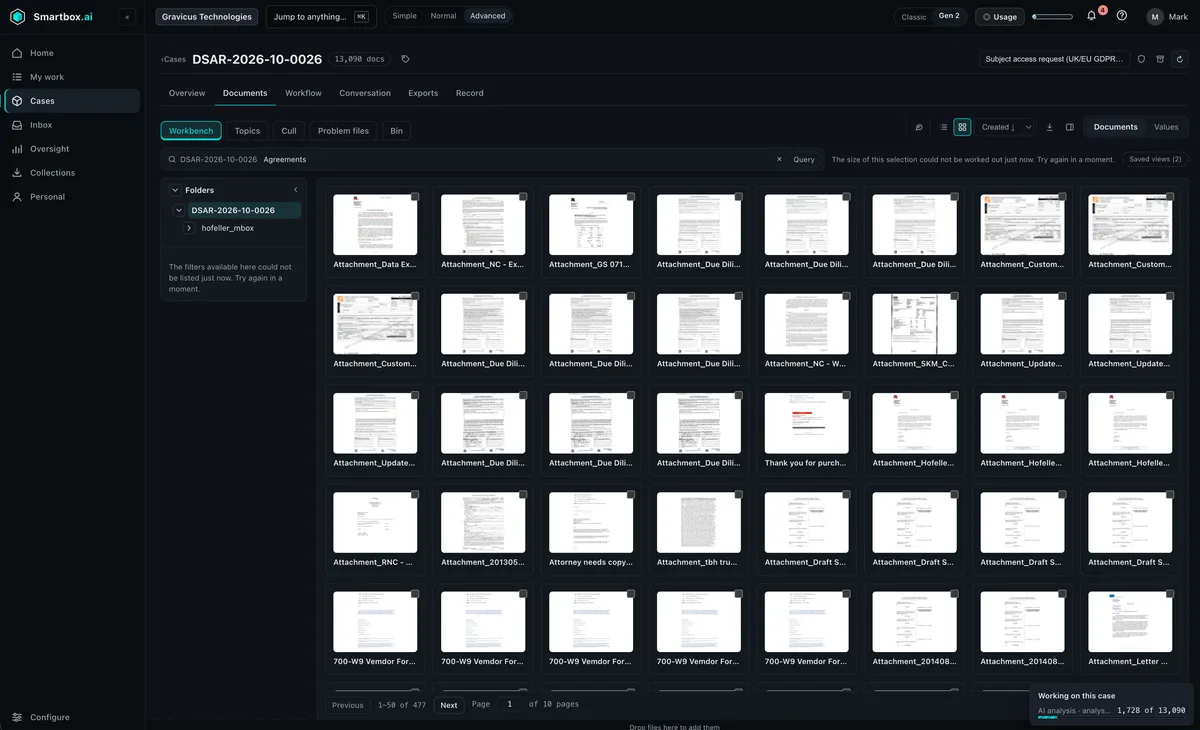
Document thumbnails in a case, with AI analysis running across the collection.
  • Forensic collection from a wide set of sources
  • Email routing and an inbox for every case
  • Video, audio and better spreadsheet support
  • OCR for images embedded in documents
  • No limit on pages per document
Control your data

02 · Control risk

Decisions you can defend.

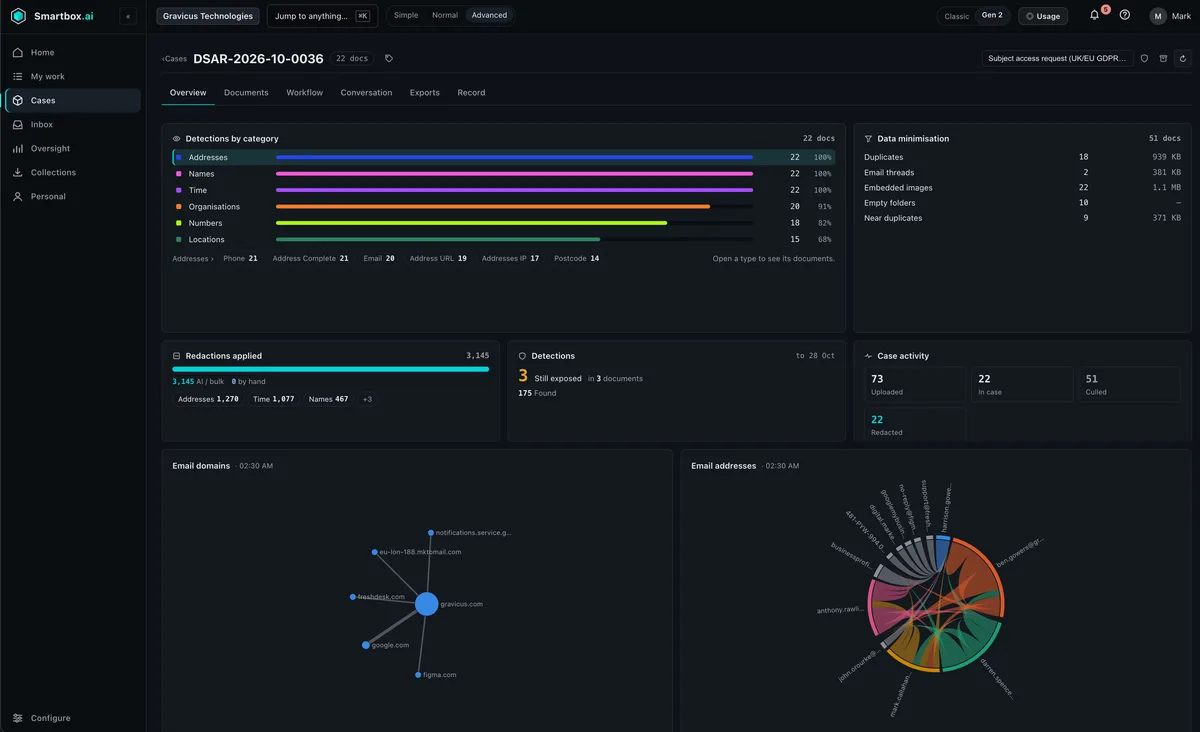
A case dashboard showing detections by category, data minimisation, redactions applied and detections still exposed.
  • Production sets validated before release
  • SLA clocks on every case
  • Legal hold and retention schedules
  • ROPA kept alongside the work
  • Comment-driven workflows and assignment
Control risk

03 · Control costs

Spend where it matters.

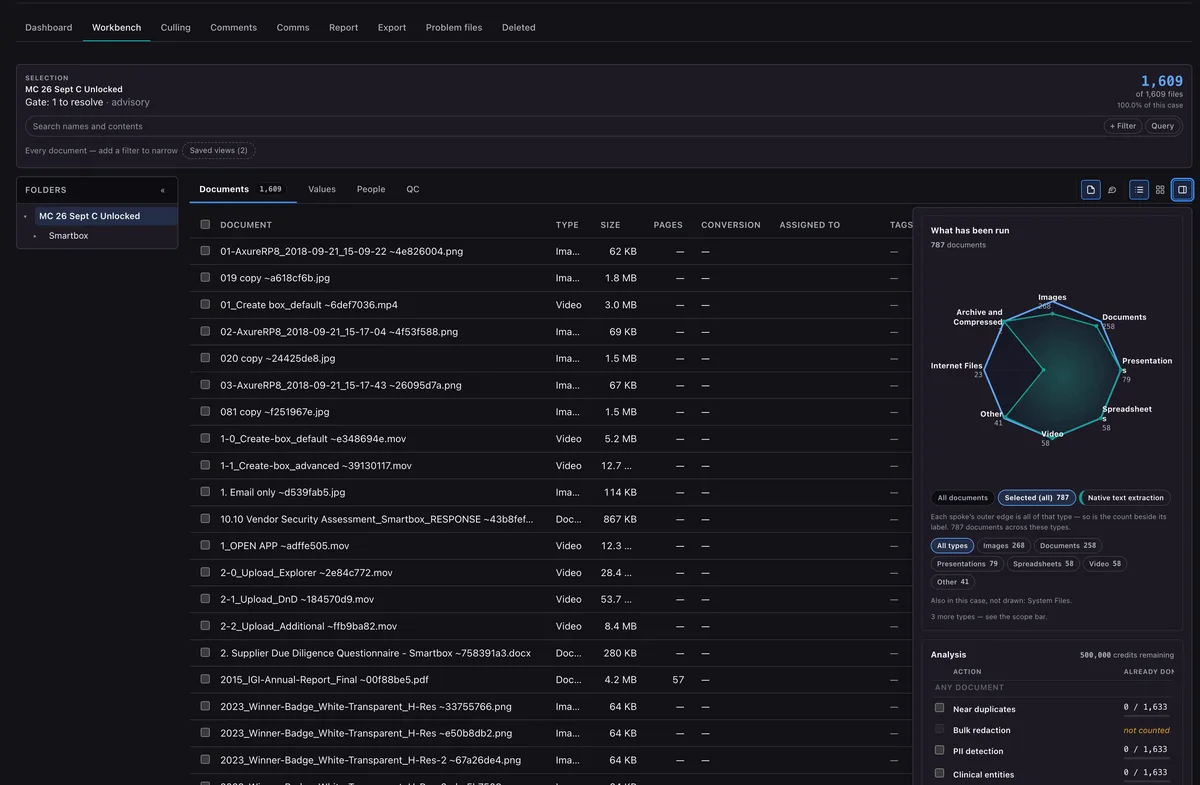
The workbench, with the analysis panel showing near duplicates and bulk redaction, and the case's remaining credits.
  • Credit-based billing, with the balance in view
  • Bulk redaction across a whole case
  • Configurable near-duplicate detection
  • NIST list support takes system files out of review
  • End-to-end workflows, from the first email
Control costs

Dynamic, configurable workflows

Automated from the first email.

Email routing opens the case and starts its workflow: acknowledgement, identity and scope, hold, collection, analysis, redaction and release. You decide where a person steps in.

How workflows work
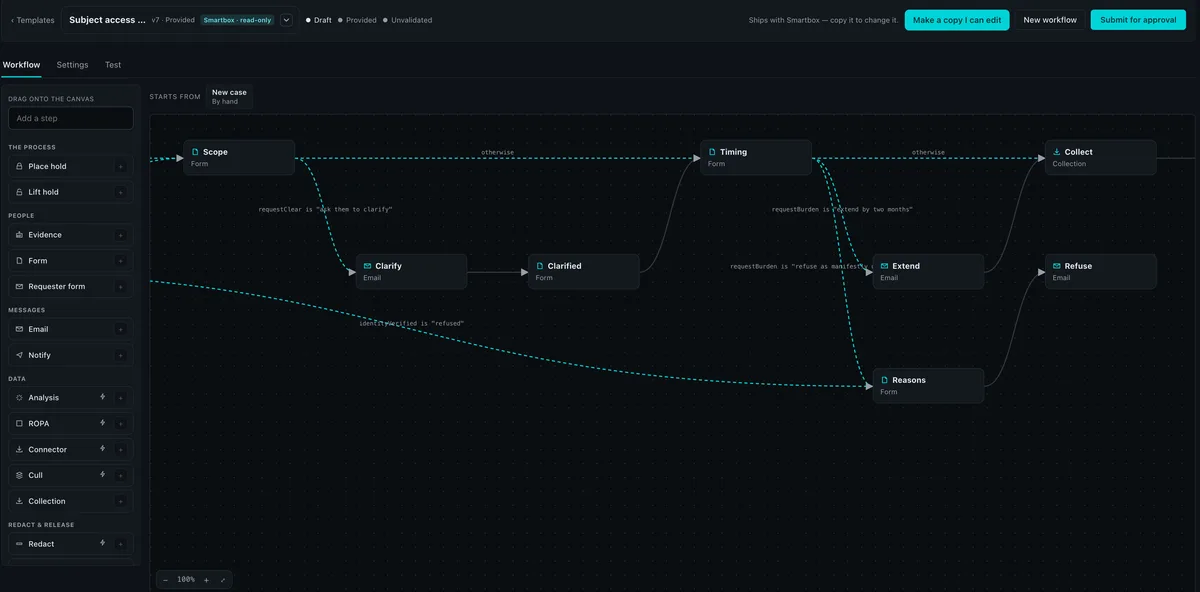
The workflow designer, with a subject access workflow's steps joined by conditional routes.
  1. Email routed
  2. Acknowledged
  3. Requester form
  4. Your rules
  5. Hold and collect
  6. Analyse and cull
  7. Redact and review
  8. Validate and release

See a workflow run end to end, from the first email.
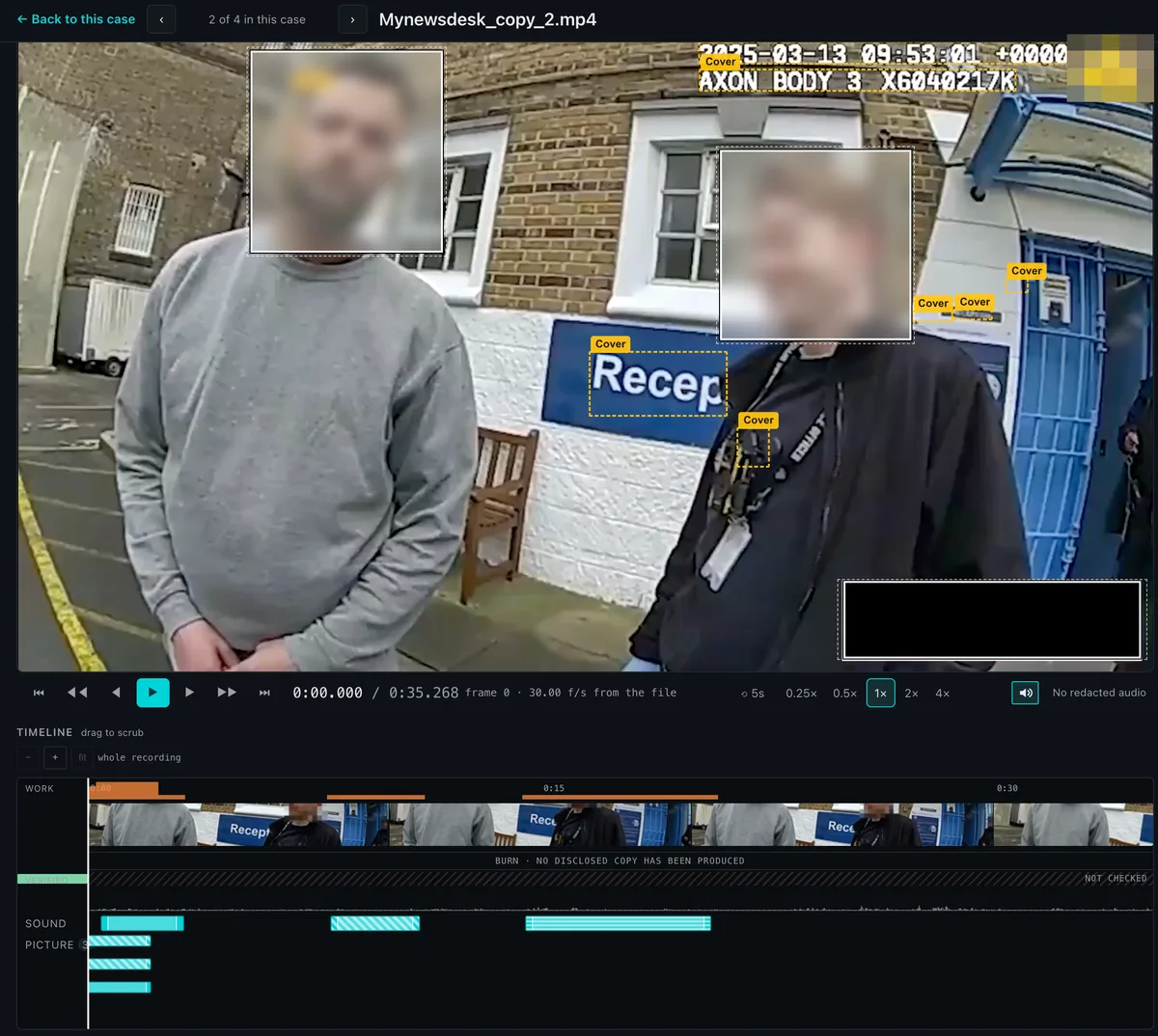
Body-worn video in the Smartbox viewer: faces and on-screen details are covered, with separate sound and picture lanes on the timeline.

Video and audio

Body-worn video, CCTV and calls, redacted where you work.

Transcribe and redact video, body-worn video and CCTV on the same platform as the rest of the case. Redact sound and picture separately, and follow a moving subject.

  • Separate sound and picture lanes on one timeline
  • Cover faces, names and on-screen detail
  • Comments pinned to the moment they’re about
See AI redaction

Dynamic dashboards

Your day, and your case, at a glance.

Dashboards that move with the work: one for each person’s queue, one for each case’s exposure.
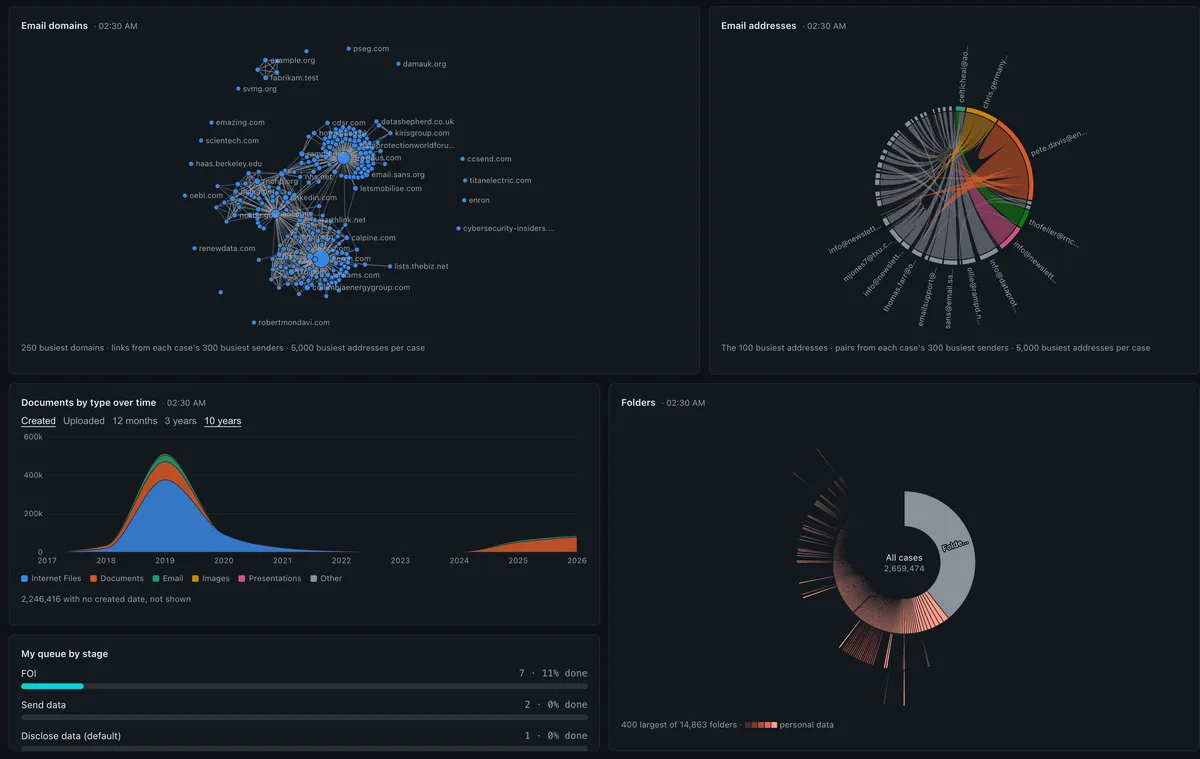
A personal dashboard with an email domain network, an address chord diagram, documents by type over time, a folder sunburst and a queue by stage.
Personal. Your queue by stage, what’s waiting for you, and the shape of what you hold.
A case dashboard showing detections by category, data minimisation, redactions applied, detections still exposed and case activity.
Case. Detections, data minimisation, redactions applied and what is still exposed.

Everything new in Gen 2.

  • ● Data
  • ● Risk
  • ● Costs
  • ● Experience
  • ● Data

    Topic map

    Unsupervised machine learning maps every document into themes and topics.

  • ● Data

    Forensic collection

    Collect from a wide set of sources, with chain of custody from the start.

  • ● Data

    Email routing

    Requests that arrive by email open the right case and start its workflow.

  • ● Data

    Per-case inboxes

    Every communication about a case, recorded with the case.

  • ● Data

    Video and audio

    Redact faces, voices and on-screen detail alongside documents.

  • ● Data

    Better spreadsheets

    Workbooks reviewed and redacted as reliably as documents.

  • ● Data

    Unlimited pages

    No limit on pages per document, however long the file.

  • ● Data

    OCR for embedded images

    Text inside images in documents and emails is read and searchable.

  • ● Data

    Document comparison

    Two documents side by side, with every difference shown.

  • ● Risk

    Production validation

    Every production set is checked at the gate before it leaves.

  • ● Risk

    SLA support

    Statutory and contractual deadlines tracked on every case.

  • ● Risk

    Comment-driven workflows

    A question or a blocker in a comment moves the work on.

  • ● Risk

    Assign to people or teams

    Hand documents to a person or a team, and see every queue.

  • ● Risk

    Legal hold

    Holds block deletion and release while a matter is live.

  • ● Risk

    Retention schedules

    Decide how long each case is kept, and let the schedule act.

  • ● Risk

    ROPA support

    Your Record of Processing Activities, kept with the work it describes.

  • ● Risk

    Dynamic dashboards

    Personal and case dashboards that update as the work moves.

  • ● Costs

    Credit-based billing

    Spend credits on what each case needs, with the balance in view.

  • ● Costs

    Bulk redaction

    One decision applied to every matching instance across a case.

  • ● Costs

    Near-duplicate detection

    Set the similarity you want, and review the same content once.

  • ● Costs

    NIST list support

    Known system and software files are taken out of review.

  • ● Costs

    Dynamic workflows

    Configurable workflows, with forms, emails and branches, automated end to end.

  • ● Experience

    Role-specific experiences

    Simple, Normal and Advanced modes, so each role sees what it needs.

  • ● Experience

    Dark mode and themes

    An enhanced interface built for long days of review.

  • And more.

    Everything in the beta

What would Gen 2 cost for your caseload?

Your data stays yours

Your data stays yours.

Disclosure means handling the most sensitive material an organisation holds. These are the promises we make about it.

Security & compliance
  • Never shared with third-party AI providers

    We never share your data with third-party AI providers.

  • Ethically trained AI

    Our models are trained on our own content, on synthetic data we generate, and on sources we hold written authorisation to use. Never on customer material.

  • Encrypted at rest and in transit

    All data is encrypted at rest with AES-256 and in transit with TLS 1.2 or later.

  • UK-only processing

    Your data is processed in the UK.

Trusted by teams who answer to regulators

“With Smartbox.ai, we reduced our SAR response time from weeks to just a couple of days.”
Data Protection Officer, Multi-Academy Trust
  • ISO/IEC 27001 certified
  • Cyber Essentials Plus
  • UK-only processing
  • British Data Awards 2024 — Winner

Beta open now · General availability January 2027

Take control of your next case.

Join the Gen 2 beta, or see it working on your kind of material in a 60-minute demo.

We use cookies to measure how the site is used, and — if you agree — to measure our advertising. You can accept one without the other, and declining is one click. See our cookie policy.